

buy | 
 Run, experiment with, and analyze ExtendSim models without a model development license.
ExtendSim Analysis RunTime (ART) provides a cost-effective way to put simulation models into the hands of the people who need to use them. Run models created by ExtendSim developers, explore different scenarios, adjust model settings, analyze results, and perform optimization without purchasing a full model development license.
Use ART to share simulation solutions with colleagues, analysts, decision-makers, and clients while keeping model development in the hands of the model developer. Or use it to offload time-intensive experiments, optimization, and analysis onto secondary computer.
Put Your ExtendSim Models to Work
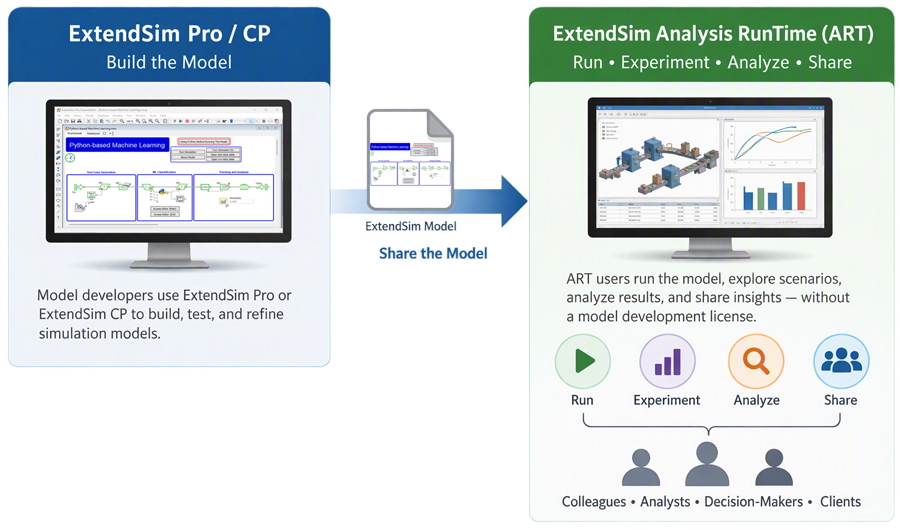 Once a model has been developed in ExtendSim Pro or ExtendSim CP, ART gives other users the ability to work with that model without providing the tools to build or modify its underlying structure.
With ART, users can:
- Run pre-built ExtendSim models, including models that connect with Python, and interact with model controls and settings.
- Work with Python-connected models that extend ExtendSim simulations with Python-based calculations, data processing, and other specialized functionality.
- Experiment with different scenarios and compare results.
- Perform optimization and Scenario Analysis using capabilities built into the model.
- View model animation and results as the simulation runs.
- Import and export data for use with other applications and workflows.
- Save changes and results for continued analysis.
- Work with ExtendSim databases, including adding records and fields or creating databases for storing results.
- Offload simulation runs and analysis to other computers when additional processing capacity is useful.
Extend Simulation Beyond the Model Developer
ART is especially useful when simulation models need to be distributed to a wider group of users.
Share models with colleagues and clients
Provide others with access to the simulation while maintaining separation between model development and model use. ART users can interact with the model and analyze results, but ART does not provide the manual model- and block-building capabilities of ExtendSim Pro or CP.
Expand your simulation capacity
Move time-intensive experimentation, optimization, or analysis to additional computers instead of tying up the model developer's system.
Integrate ExtendSim with other applications
ART can also serve as a simulation engine controlled by another application. ExtendSim supports COM-based communication for applications that remotely control simulation runs, make model changes programmatically, and exchange data.
For simulations accessed through an intranet or the Internet, use ExtendSim Cloud.
ART Capabilities
Simulation and Analysis
Database Capabilities
- Add records and fields to existing ExtendSim databases
- Create databases for managing and storing simulation results
Integration and Automation
- Call COM DLLs
- Control ExtendSim from compatible external applications using COM
- Programmatically run models and modify accessible model settings
Libraries
- Read custom libraries converted to runtime (.lbrrt) format
- Includes regular (.lbr) and runtime (.lbrrt) versions of the libraries supplied with ExtendSim Pro
Reliability Analysis
- Unlimited Event Cycles for Reliability Block Diagramming using the Reliability module
Designed for Running Models, Not Building Them
ART is intentionally focused on model execution and analysis.
ART does not provide the tools to manually build models or blocks or manually change the model's configuration. Models must first be created using an ExtendSim model development product.
ART also does not include example models or include files, and support for a particular deployed model comes from that model's developer. Remotely controlling models through ART requires programming.
Choose the ART License That Fits Your Deployment
License Types
Subscription • Get ongoing access to ExtendSim ART with the flexibility of subscription licensing.
Perpetual • Purchase a license that provides continued use of the licensed version of ExtendSim ART.
License Options
Individual • For a single named user who needs ART on their computer.
Floating • Share ART among users on your network based on the number of concurrent licenses purchased.
Global Floating • Share concurrent ART licenses across a broader worldwide organization.
Node-Locked • Multiple users can access ART sequentially on one computer. Great for secure environments.
| View License Types & Options → |
| View ExtendSim Pricing → |
| Purchase ExtendSim ART → |