

See What You Can Solve with ExtendSim
Experience ExtendSim 2026 with a free 30-day Trial of ExtendSim Pro or ExtendSim CP.
Both products provide a powerful, flexible environment for building simulation models, analyzing results, managing model data, and creating customized modeling solutions. Choose the product that best matches the type of systems you want to model.
ExtendSim Pro provides the complete ExtendSim simulation environment, with capabilities for Discrete Event, Discrete Rate, Reliability, Continuous, and agent-based modeling. It also includes advanced analysis, development, database, diagnostics, and integration tools.
ExtendSim CP is designed for Continuous simulation and custom model development, with powerful tools for data management, application development, integration, reporting, analysis, and diagnostics.
Both Pro and CP include Python integration through the Python Bridge block, allowing ExtendSim models to work with Python code and libraries.
Not sure which product is right for you? Visit ExtendSim Features to compare capabilities.
Download ExtendSim Pro or CP and explore the software free for 30 days.


Getting Started with Your Trial
Download and install the Trial version of ExtendSim Pro or ExtendSim CP. When you launch ExtendSim, select Try in the Activation Dialog to begin your 30 day Trial.
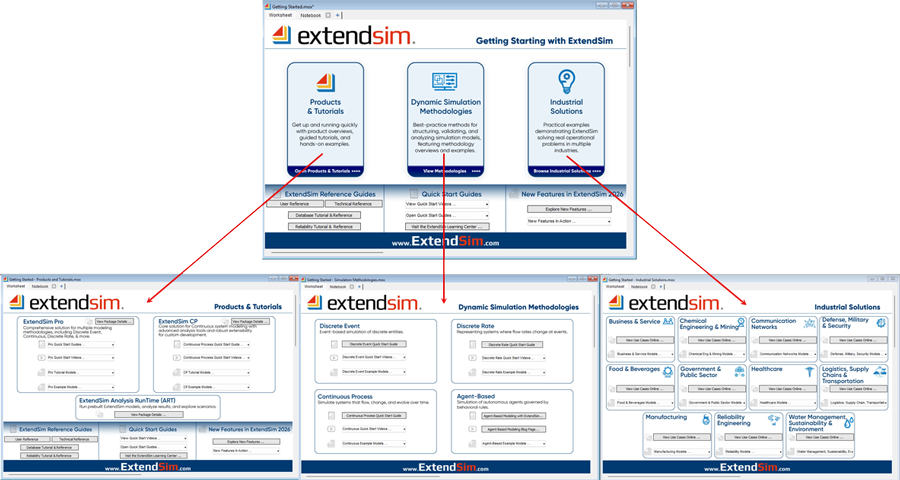 Once ExtendSim opens, use the Getting Started window resources to:
- Follow videos, tutorials, and example models to learn how to build and run simulations.
- Work through the Quick Start Guides for the type of modeling you want to explore. The available guides include Continuous Process, Discrete Event Process, and Discrete Rate Process tutorials.
- Open pre-built models that accompany the Quick Start tutorials.
- Explore sample models to see ExtendSim capabilities in action.
- Experiment with model building, data management, analysis, customization, and other features available in the product you're evaluating.
Resources to Help You Along the Way
As you explore ExtendSim, you'll have access to a variety of learning and reference resources:
- Quick Start and Reference Guides provide step-by-step introductions and detailed information about ExtendSim. The documentation site includes the User Reference, Technical Reference, Database Tutorial & Reference, Advanced Resource Management Tutorial & Reference, and Reliability Tutorial & Reference.
- The ExtendSim Learning Center offers Quick Start resources, feature and modeling videos, webinars, model-building templates, sample models, and additional documentation.
- ExtendSim Help provides application and block-level information while you're working in the software.
- Visit the ExtendSim FAQs for answers to common questions.
System Requirements
The ExtendSim Trial follows the system requirements for standard ExtendSim licenses.
ExtendSim requires a 64-bit version of Windows 10 or Windows 11 and a supported 64-bit Intel or AMD processor. See System Requirements for complete hardware, operating system, memory, connectivity, and compatibility information.system requirements.
Trial Licensing
The ExtendSim Trial is intended for evaluation by the person who downloaded it and may be used for 30 days.
During your Trial, you can choose to purchase ExtendSim and activate your installation with an Activation Key.
The Trial may not be installed on a server, made available for use by others, redistributed on external media, or posted online. For complete licensing terms, review the ExtendSim License Agreement.