

Manual activation bypasses your device's lack of internet access or its blocking of communication (via firewalls or the like). Secured or hardened locations require manual activation; other locations might need manual activation due to system configuration.
- If ExtendSim is unable to accomplish activation automatically, it will present a message such as “Unable to Perform Automatic Activation” or “License Activation Problems”.
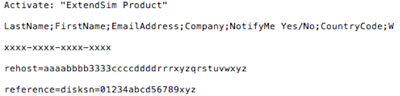 In the message, click the “Save Activation Info as Text File” or the “Manual Activation” button to generate a text file (ExtendSim Activation Info.txt) that contains the activation information.
- You can save the text file anywhere you want; by default it is saved to the top level of your Documents folder.
- Using an email address that can receive an attached text file in return, email the text file to Sales.ExtendSim@Andritz.com.
- We will generate a license file named extendsim.lic and email it to you. (Note: Typically we get back to you within an hour or two, but it may take up to 3 days to process.)
- Place the extendsim.lic file into the ExtendSim folder that contains the user-modifiable files (by default, User Name\Documents\ExtendSim). (Don't place it in the Program Files\ExtendSim or ExtendSim\Documentation folder!)
- Restart ExtendSim and you’ll be activated!
Once activated, the ExtendSim startup screen displays your Activation Key and Maintenance & Support Plan (MSP) renewal date. (MSP not applicable to ExtendSim Student.)